Teamfight Tactics
Teamfight Tactics is moving from Riot's in-house engine to Unreal Engine 5. Hundreds of cosmetics (Little Legends, arenas, emotes, finishers) come across through an automated import, and the import leaves behind edge-case bugs that the artists polishing the content then fix by hand. I joined the team during that move, reading from the legacy project, where the source data lives, and fixing in the UE5 project.
My focus is on the bugs that repeat. A single fix is quick. Finding the hundred other assets with the same problem, and being sure a change is safe on each of them, is the slow part. So most of my work is auto fixers, for anything that can be batched, scripted, or fixed agentically: Python batch fixers that use the legacy engine's data as the source of truth, guided fixers that turn the leftover hand fixes into a review board, a bug patterns system, and an agentic AI framework that helps artists and Tech Artists investigate and fix problems faster. The goal underneath all of it is artist time: automating the tedious conversion work so it goes to the things that need an artist's eye.
Batch Fixes From Legacy Data
The audio team was fixing emote sounds by hand, one module at a time, across hundreds of converted animation timelines. The import had dropped three settings: how likely a sound is to play, how long it waits before playing, and whether only the owning player hears it. All three still existed in the source data, split between the Wwise project files and the legacy game data.
I built two Unreal Python tools that sit in the editor's right-click menu. The fix tool applies the missing values to the selected assets. The review tool compares the source values against what is in UE5 and writes a report. Both were built for the person using them:
- A progress bar with cancel, and a summary at the end with a path to the full report
- A warning dialog when source data is missing, with the choice to continue on what's there
- Safe to run again: it only fills in values still at their import defaults, and it flags anything someone already set by hand instead of overwriting it
- Only assets that actually changed get saved, so no extra Perforce checkouts
AI agents wrote most of the code, with me directing each step: research, plan, build, fix. I tested it the way I'd test anyone's tool. I audited the data before and after each run, ran it on single assets and on batches to find where it broke, and then had the person I built it for use it and give feedback. The docs were written for two readers: the artist using it (what it changes, where the data comes from, known limits) and whoever maintains it next (key decisions and error handling). When the audio team found that one setting needed to be applied a different way to work in game, I changed the fix tool to match and updated the review tool to check it the same way.
The same approach drives a rerunnable audit for tactician actions that have no animation assigned. After a round of batch fixes, rerunning it showed what had been fixed and that nothing new had broken.
AI-Guided Fixers
Some fixes need a judgment call on every asset, so a plain editor script can't make them safely. For those I built guided fixers: batch fixers that use AI reasoning, run as agent skills, working from criteria I wrote down from doing the same fixes by hand. That makes them smarter than a script while following the same process an artist would. The work is split three ways:
- Python scripts gather and record. They read what the game actually uses (the character's data asset, not what the file names suggest), compare it to the source data, and write down everything they find.
- The agent judges, against the written criteria file I maintain.
- A person decides anything that needs taste, using a review board.
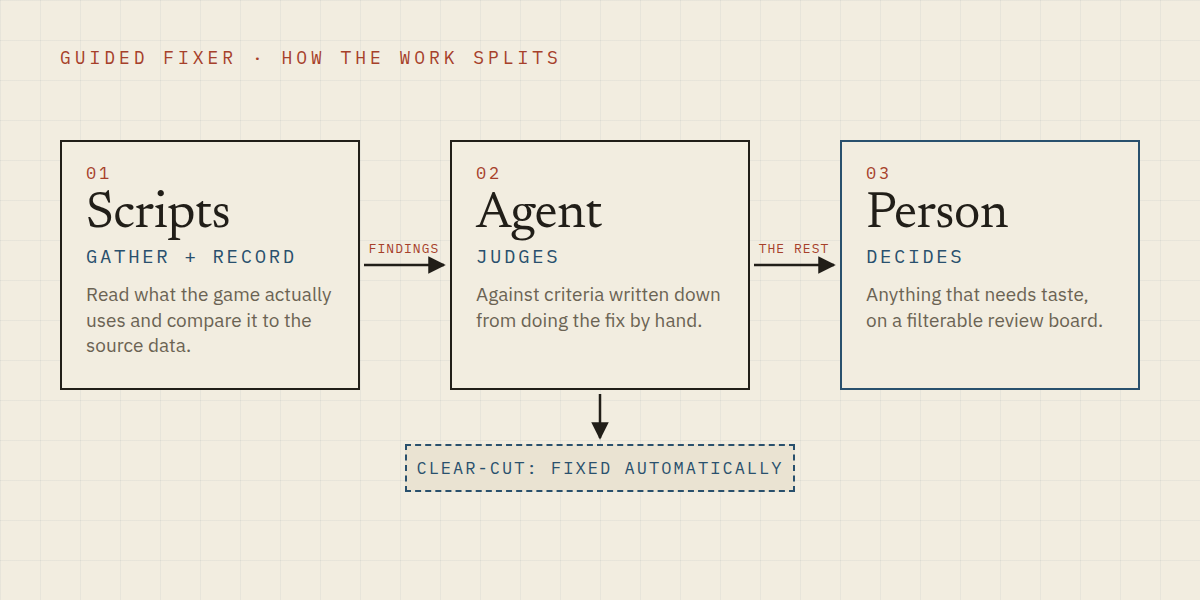
Both fixers below make the clear-cut changes automatically. Everything else goes onto the review board, an interactive HTML page rather than a wall of text to slog through: it can be filtered, every row names the asset, what differs from the source, and the proposed fix, every flag carries a plain-language explanation, and review notes save next to it and survive rebuilds. Whoever picks up a hand fix starts at the answer instead of searching for the problem.
Emote VFX
Every tactician (the avatar a player controls, like a Little Legend) has a Greeting and a Celebrate emote, and many reuse the VFX of another emote like the Joke or Dance. The import gives the Greeting its own timeline pointing at the raw imported effects, so when the Joke was switched over to the polished versions, the Greeting still pointed at the raw ones. There were roughly 5,200 of these timelines in the project. Each fix is small: point one effect at the polished version. The work is in finding the right version and knowing the change is safe.
The fixer finds the emote each Greeting was built from and matches effects by name, attach point and timing. It only changes which version of an effect plays. If an effect also needs a placement or timing change, it changes nothing on that effect and sends it to the review board, because a half-fixed effect looks finished and isn't. Everything else on the same emote still gets fixed. A test set of 121 timelines that must never get a proposed change, plus a rerun check, guards against the tool drifting between batches. It has been applied to a 19-tactician release batch.
VFX Materials
An older version of the importer assigned the wrong materials and textures to some tactician VFX. The importer was fixed, but the effects already imported kept the wrong ones, and a reimport would overwrite polish work. The hard part is telling a material the import got wrong from one an artist changed on purpose.
The fixer compares each effect's material against the legacy game data, then checks the asset's Perforce history, so a material an artist changed by hand goes to review instead of getting swapped. Changes are applied under supervision, never submitted automatically, and a second review sheet lists every change actually made, ordered the way an artist moves through the asset: animation timeline, then VFX system, then emitter. For targeted bug fixes it also has a read-only mode that lists every material on one tactician next to the effect that uses it, as a searchable sheet.
Inside the Animation System
A lot of the conversion bugs live in the animation system, so I learned it at every layer. TFT's animation states aren't a classic state machine; they're timeline-based. Gameplay triggers on a character's data asset start a timeline, and the timeline carries the animation clip alongside VFX and audio clips, each with its own properties, down into the clips and Niagara systems themselves. Fixing a bug in that chain means knowing which layer it actually lives in.
For assets that came through the import wrong, I built right-click reimport helpers: select the asset in Unreal, run the helper, and it is pulled back in correctly.
Bug Patterns System
Hundreds of Little Legends still had to be converted, and there was a lot of bug and fix history from the ones that had already shipped. I built a Python pipeline that pulls that history from Jira, Perforce and Slack into a SQLite database, then had AI agents read each bug and its fix and tag the cause, working from a tagging guide and vocabulary I wrote. The scripts gather and build the database; the agents make the calls about cause and grouping; I steer through the input files.
The audit covered 744 bugs and grouped them into 152 fix opportunities: places where an importer fix, a validator, or a batch fixer could clear a whole group of bugs before they reach QA. The ranked board, a browsable dashboard and the database went to the tech art team. Since then I've generalized the audit so anyone on the team can run it on other cosmetic types, starting with arenas.
That work turned into a shared Bug Patterns Library: one record of each known bug pattern, its symptoms, its cause, its fix, and how sure we are about each. Anyone can add to it. When a new ticket comes in, people and AI tools match it against the library to reach the probable fix fast, and a pattern that keeps showing up becomes a candidate for a batch fixer or an importer fix. It lives in Perforce with two agent skills, one to check whether a new bug is already known and one to add to the library, plus instructions that tell other people's agents how to query it.
Some of the work was with people. I asked the artists polishing the content which bugs they kept fixing by hand and what they wished they could script. I also worked with QA on how bugs get written up, so each kind of fix ("VFX appear black", "missing animation") gets its own ticket and a group of tickets with the same cause can go straight to a batch fixer.
Agentic AI Framework
The tools above were built with AI agents, and the later ones run through an agentic AI framework I set up for artists and Tech Artists in Devin. Ask in plain language and it finds the context it needs: a question about the engine, about a bug you're working on, about how to set up a certain type of effect or fix a material, or help prioritizing a Jira backlog. It connects the agent to the places the team's knowledge lives (Jira, Slack, Notion, Perforce, the Unreal editor through MCP), and adds skills for common jobs like investigating a bug, looking up file history, or running a batch fixer. You bring the question; the agent loads what it needs to answer it, so it's easy to pick up and the answers can be trusted.
The part I spent the most time on is the base rule set. LLMs are trained to look finished: they give a confident answer, stop searching at the first likely result, and fill gaps with a plausible guess. The rules work against that directly. The agent marks which claims it checked and which it inferred, states how much it actually looked at, tries to disprove its own lead before reporting it, and asks instead of guessing. When I correct it, the correction gets written into the workspace, so the next session starts with it.
In a pilot of the bug-matching skill on four real tickets, one had no clear match in the library. The agent said so, listed the closest candidates, and named the one detail that would tell them apart, which gave the investigation a real place to start.
I've developed this into a starter kit for artists and Tech Artists on the team who haven't used agentic AI before: rules, skills, MCP setup, domain context packs, and a beginner's handbook, built so each person's workspace gets better the more they use it.
Working in Devin
At Riot the agent tool is Devin, running Claude and other model families, so the framework is built on Devin's harness. A lot of it is an orchestration layer of my own on top: hooks that keep track of the session and restore the rules after the agent's memory gets compacted, a start-of-session step that loads the right context, custom subagent setups with a model picked for each job, and skills that carry their own instructions so they work in someone else's workspace.
Building that meant learning where the harness helps and where it gets in the way, and testing it instead of guessing. One example: a skill that asks for subagents wasn't enough to get the agent to use them, because the harness tells it to wait for the user to ask. I ran side-by-side tests on two near-identical skills and found the one line that fixes it. I share findings like that with our contacts at Cognition, the company behind Devin, along with feature requests from building tools other people will run.
I've also learned how different model families and sizes behave, and when each is the right pick. Some jobs need a model that applies rules carefully and decides what matters. Others can go to a much cheaper model that's fine at gathering data for another agent, but too terse and jargon-heavy for anything a person reads. Each family also needs its own guidance to give good results, so the framework carries separate writing rules for them.
For more on how I work with AI tools, see the How I Work page.